Sep
2017
LibreOffice Calc Hints
12 Sep 2017
How to swap a column in Calc:
Select column B
Click anywhere in the highlighted area and drag the column. The mouse pointer should change to show the drag operation.
Before you release the mouse button, also press the Alt key. When the mouse pointer is at the left side of column A, release the mouse button.
Column B should be moved to the left of column A so that A and B are switched.
How to swap a column in Calc:
Select column B
Click anywhere in the highlighted area and drag the column. The mouse pointer should change to show the drag operation.
Before you release the mouse button, also press the Alt key. When the mouse pointer is at the left side of column A, release the mouse button.
Column B should be moved to the left of column A so that A and B are switched.
Sep
2017
PhpStorm
08 Sep 2017
Hotkeys
Ctrl + ]           goto next bracket
Ctrl + Shift + ]   select all for next bracket
Ctrl + Shift + M   jump before or after closest bracket
ALT + Up | Down    next function
ALT + Home         breadcrumbs
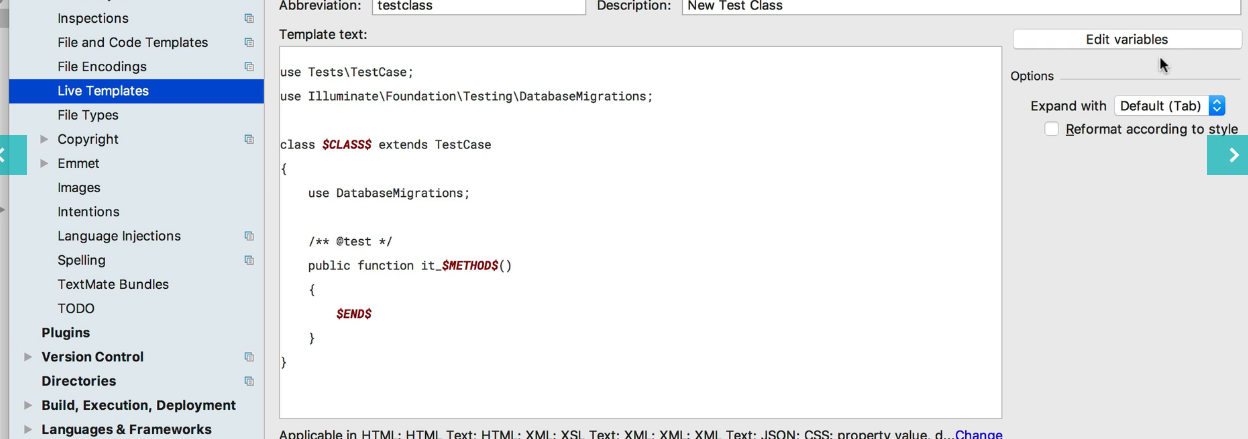
Live templates
Hotkeys
Ctrl + ]           goto next bracket
Ctrl + Shift + ]   select all for next bracket
Ctrl + Shift + M   jump before or after closest bracket
ALT + Up | Down    next function
ALT + Home         breadcrumbs
Live templates
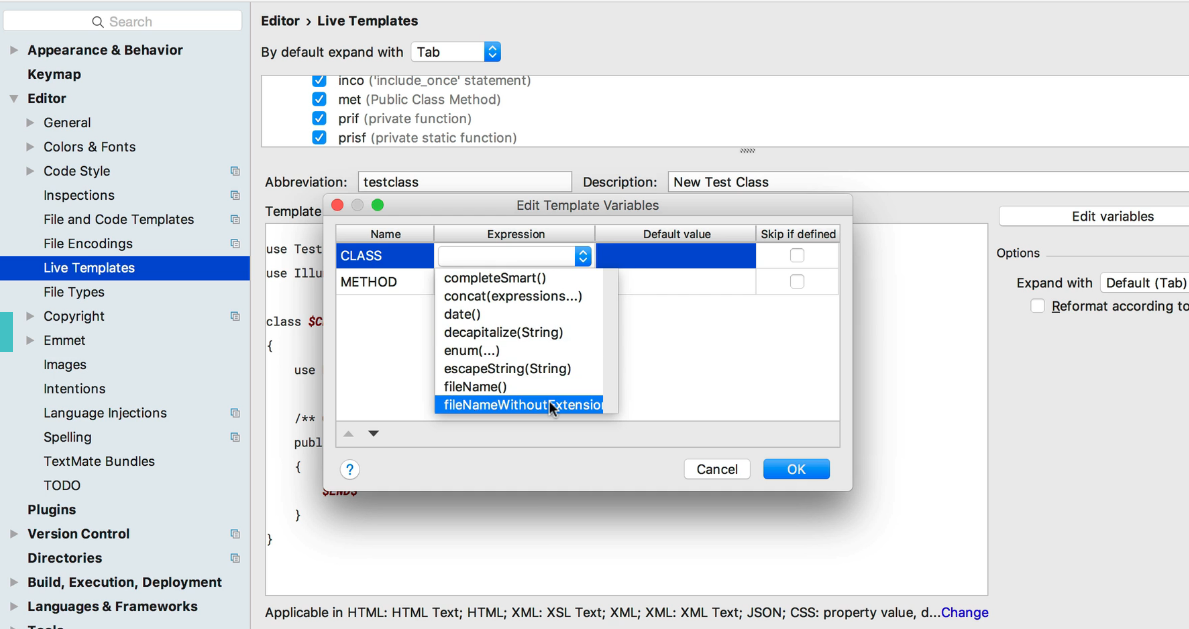
How to make dynamic class name:
Plugins
Sep
2017
Nginx Application Server
07 Sep 2017
Laravel
location / {
    proxy_pass       http://127.0.0.1:8300;
    proxy_redirect   http://127.0.0.1:8300/ /;
    proxy_read_timeout 60s;
    proxy_set_header Host $host;
    proxy_set_header X-Real-IP $remote_addr;
    proxy_set_header X-Forwarded-For $proxy_add_x_forwarded_for;
    proxy_set_header X-Forwarded-Proto $scheme;
}
Laravel
location / {
    proxy_pass       http://127.0.0.1:8300;
    proxy_redirect   http://127.0.0.1:8300/ /;
    proxy_read_timeout 60s;
    proxy_set_header Host $host;
    proxy_set_header X-Real-IP $remote_addr;
    proxy_set_header X-Forwarded-For $proxy_add_x_forwarded_for;
    proxy_set_header X-Forwarded-Proto $scheme;
}

location ~ \.php$ {
    proxy_pass       http://127.0.0.1:8300;
    proxy_redirect   http://127.0.0.1:8300/ /;
    proxy_read_timeout 60s;
    proxy_set_header Host $host;
    proxy_set_header X-Real-IP $remote_addr;
    proxy_set_header X-Forwarded-For $proxy_add_x_forwarded_for;
    proxy_set_header X-Forwarded-Proto $scheme;
}
Config
{
    "applications": {
        "laravel": {
            "type": "php 7.0",
            "user": "nobody",
            "group": "nobody",
            "workers": 2,
            "root": "/var/www/vhosts/laravel/public",
            "script": "index.php",
        },
    },
    "listeners": {
        "*:8300": {
                "application": "laravel"
        }
    }
}
Sep
2017
Message reminder
06 Sep 2017
vi /path/to/message.sh
#!/bin/bash
PID=$(pgrep gnome-session)
dbus=$(grep -z DBUS_SESSION_BUS_ADDRESS /proc/$PID/environ|cut -d= -f2-)
export DBUS_SESSION_BUS_ADDRESS=$dbus
notify-send -u critical "$1"
crontab:
0 * * * * /path/to/message.sh "my message"
vi /path/to/message.sh
#!/bin/bash
PID=$(pgrep gnome-session)
dbus=$(grep -z DBUS_SESSION_BUS_ADDRESS /proc/$PID/environ|cut -d= -f2-)
export DBUS_SESSION_BUS_ADDRESS=$dbus
notify-send -u critical "$1"
crontab:
0 * * * * /path/to/message.sh "my message"
Aug
2017
Ubuntu Service Autostart
19 Aug 2017
vi /etc/systemd/system/mongodb.service
[Unit]
Description=High-performance, schema-free document-oriented database
After=network.target

[Service]
User=mongodb
ExecStart=/usr/bin/mongod --quiet --config /etc/mongod.conf

[Install]
vi /etc/systemd/system/mongodb.service
[Unit]
Description=High-performance, schema-free document-oriented database
After=network.target

[Service]
User=mongodb
ExecStart=/usr/bin/mongod --quiet --config /etc/mongod.conf

[Install]
WantedBy=multi-user.target
systemctl start mongodb
systemctl enable mongodb
vi /etc/systemd/system/elastic.service
[Unit]
Description=Port forwarding for 9200
After=network.target

[Service]
User=javelin
ExecStart=/usr/bin/ssh -NTC -o ServerAliveInterval=60 -o ExitOnForwardFailure=yes -o StrictHostKeyChecking=no -R 9201:15.0.33.22:9200 user@host.com
RestartSec=3
Restart=always

[Install]
WantedBy=multi-user.target
systemctl start elastic
systemctl enable elastic
https://blog.kylemanna.com/linux/ssh-reverse-tunnel-on-linux-with-systemd/
Jul
2017
Install Xdebug for PHP Ubuntu
15 Jul 2017
Prepare to install:
apt install php7.0-xdebug
php --version
Find xdebug path (latest by year):
find / -name 'xdebug.so' 2> /dev/null
Config update vi /etc/php/7.0/fpm/php.ini:
Prepare to install:
apt install php7.0-xdebug
php --version
Find xdebug path (latest by year):
find / -name 'xdebug.so' 2> /dev/null
Config update vi /etc/php/7.0/fpm/php.ini:
zend_extension="/usr/lib/php/20160303/xdebug.so"
xdebug.remote_autostart=on
xdebug.remote_enable=on
xdebug.remote_handler="dbgp"
xdebug.remote_host="localhost"
xdebug.remote_port=9000
xdebug.remote_mode=req
xdebug.overload_var_dump=off
xdebug.idekey = PHPSTORM
xdebug.max_nesting_level = 512
xdebug.file_link_format = phpstorm://open?%f:%l
Then restart:
service php7.0-fpm restart
Jul
2017
Jul
2017
DisplayLink Ubuntu
12 Jul 2017
Install drivers (http://support.displaylink.com/knowledgebase/articles/684649-how-to-install-displaylink-software-on-ubuntu)
Disable secure boot
Create file:
$ vi /usr/share/X11/xorg.conf.d/10-intel.conf
Paste This:
    Section "Device"
        Identifier  "Intel"
Install drivers (http://support.displaylink.com/knowledgebase/articles/684649-how-to-install-displaylink-software-on-ubuntu)
Disable secure boot
Create file:
$ vi /usr/share/X11/xorg.conf.d/10-intel.conf
Paste This:
    Section "Device"
        Identifier  "Intel"
        Driver      "intel"
        Option      "VSync" "false"
    EndSection
Best Solution:
$ cat /etc/X11/xorg.conf.d/20-intel.conf
Section "Device"
    Identifier "Intel Graphics"
    Driver "Intel"
    Option "AccelMethod" "sna"
    Option "TearFree" "true"
    Option "TripleBuffer" "true"
    Option "MigrationHeuristic" "greedy"
    Option "Tiling" "true"
    Option "Pageflip" "true"
    Option "ExaNoComposite" "false"
    Option "Tiling" "true"
    Option "Pageflip" "true"
    Option "VSync" "false"
EndSection
Reboot
CPU decreasing compiz https://askubuntu.com/questions/689602/disable-all-visual-effects-in-ubuntu-15-10
May
2017
Simple mail server
26 May 2017
Before installation
mysite.com MX record points to mysite.com
Step 1
Step 2
Before installation
mysite.com MX record points to mysite.com
Step 1
Step 2
Setup all, except ClamAV (if RAM is enough, ClamAV can be installed) https://help.ubuntu.com/community/PostfixAmavisNew How to siable ClamAV:
# @\bypass_virus_checks_maps = (
#    \%bypass_virus_checks, \@\bypass_virus_checks_acl, \$bypass_virus_checks_re);
Step 3
Instead Dovecot i prefer this https://help.ubuntu.com/community/PostfixBasicSetupHowto
Installing courier IMAP and POP3
apt install courier-pop
apt install courier-imap
Then
service courier-authdaemon start

systemctl enable courier-authdaemon

/etc/init.d/postfix restart
Step 4
Setup SPF
Step 5
Setup DKIM
Step 6
Setup DMARK
May
2017
After Hacking
17 May 2017
tail /var/log/auth.log
find . -type f -newermt 2017-01-01 ! -newermt 2017-01-31

grep -lr --include=*.php "base64_decode"
grep -lr --include=*.php "@require"
tail /var/log/auth.log
find . -type f -newermt 2017-01-01 ! -newermt 2017-01-31

grep -lr --include=*.php "base64_decode"
grep -lr --include=*.php "@require"